
When you use Delta, one of the first differences you’ll notice is that threads don’t use the familiar chat UI. Instead of a message box and bubbles, you just start writing your prompt in a blank box, and when you press enter, the agent replies right underneath it. You can freely move the cursor from your composer into the agent response and its tool calls, and start typing to annotate any part of it (even terminals).
That’s because the thread is a document that your team and agents collaborate on. The code changes are part of it, so any line of code leads back to the conversation that made it.
To make that work, we had to build a new kind of editor.
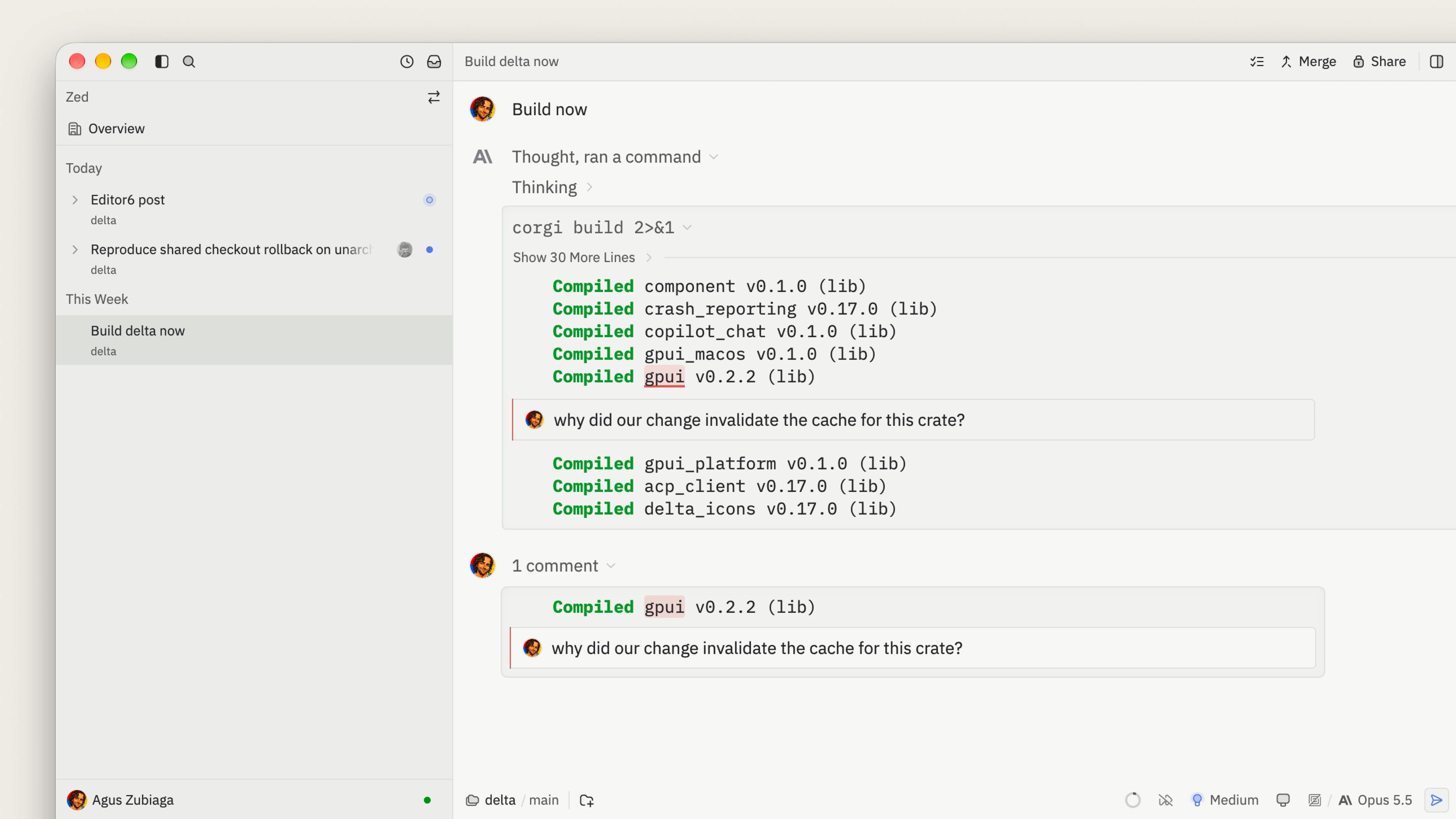
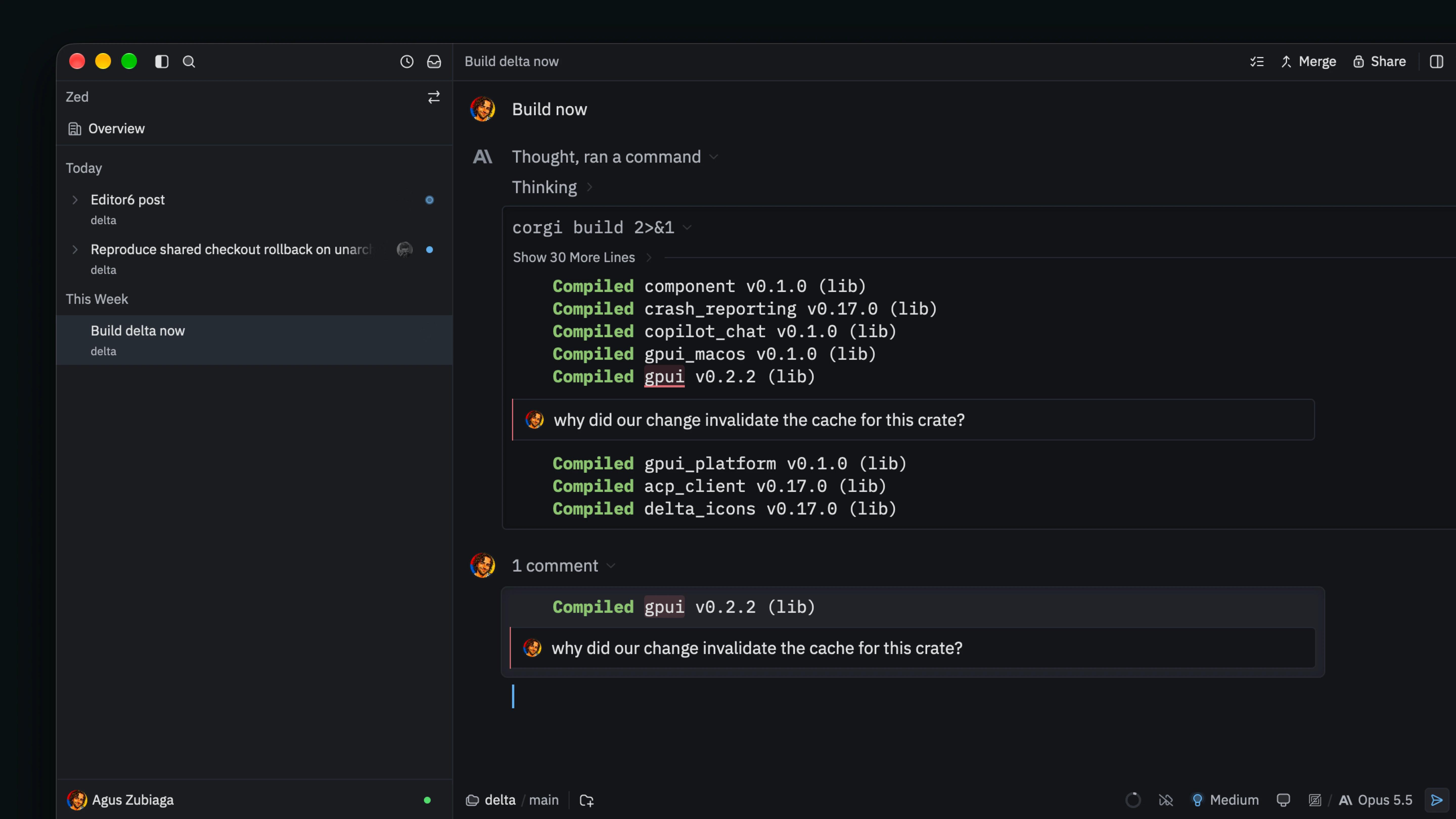
Delta’s editor can’t work like Zed
Our team has a lot of experience building fast text editors. So for Delta, we started with a very similar architecture to Zed’s editor, which involves a hierarchy of indexes that map the buffer to the screen, updated incrementally as the text changes.
After a number of iterations, we kept running into bugs where those indexes drifted from what the thread should look like.
A code editor mostly draws the buffer’s text so the indexes can follow its edits. By contrast, a thread is full of richer, stateful elements like tool calls that change status as they run, terminals streaming live output, and foldable cards. Each of them changes what we draw without touching the text, and the indexes had to keep up with all of them.
So we had to start over and ask: what is the least state we can get away with?
Let’s build an editor from first principles.
1. Editing plain text
The simplest thing an editor needs to do is show and edit plain text. This part is easy.
To store the text, we’ll use DeltaDB’s Buffer, a text CRDT powered by a Rope. The library takes care of replicating edits across all collaborators and merging them without conflicts. Antonio wrote about how DeltaDB works in more detail.
struct Editor {
    buffer: Replica<Buffer>,
    focus_handle: FocusHandle,
    selection: Range<usize>,
}
To draw it, we skip flexbox and implement GPUI’s Element trait, which gives us full control over drawing. It works in three phases: request_layout sizes the element, prepaint works out what to draw, and paint draws it. Most of the magic happens in prepaint, where we walk the buffer line by line, shape each line, and carry a y position down the screen:
type PrepaintState = Vec<(ShapedLine, Pixels)>;

fn prepaint(&mut self, bounds: Bounds<Pixels>, window: &mut Window, cx: &mut App) -> Self::PrepaintState {
    let snapshot = self.buffer.update(|buffer, cx| buffer.as_snapshot(cx));
    let mut lines = Vec::new();
    let mut y = bounds.origin.y;

    for line in snapshot.text().as_rope().lines() {
        let run = TextRun {
            len: line.len(),
            font: FONT.clone(),
            color: TEXT_COLOR,
            ..Default::default()
        };
        lines.push((window.text_system().shape_line(line, FONT_SIZE, &[run]), y));
        y += LINE_HEIGHT;
    }

    lines
}
Shaping turns the text into positioned glyphs we can draw and measure. The Vec of shaped lines is our PrepaintState, and paint draws each line at its y.
To make it editable, we implement GPUI’s EntityInputHandler trait, which connects us to the platform’s text input. This is what the other two fields are for: the focus handle lets the window route keystrokes to us, and selection is the byte range where the next one goes. When the user types, the platform hands us the text, and we insert it there:
fn replace_text_in_range(&mut self, range_utf16: Option<Range<usize>>, text: &str, window: &mut Window, cx: &mut Context<Self>) {
    let range = range_utf16
        .map(|range| self.range_from_utf16(&range))
        .unwrap_or(self.selection.clone());
    self.buffer.update(|buffer, cx| buffer.edit([(range.clone(), text)], cx));
    self.selection = range.start + text.len()..range.start + text.len();
    cx.notify();
}
The edit goes straight into the buffer, and cx.notify() requests another frame which will paint the updated text.
At this point we have something resembling a plain text input, with very little state. We’ll try to keep it that way.
Of course, a lot is missing: a cursor, soft wrapping, scrolling (that last one will turn out to matter a great deal).
2. The formatter
Plain text is great, but a Delta thread needs rich text: Markdown, code blocks, tool cards. Should we build those into the editor? The same editor also powers surfaces that aren’t threads, like the file pane, and each surface wants something different.
That’s a good sign the editor shouldn’t be the one deciding. Instead, we’ll give it a formatter: a function we write that reads the buffer and tells the editor how it should look. It receives a DocumentBuilder, which lets it style ranges of the buffer. This simple one captures messages and iterates over them, making each author’s range bold:
let editor = cx.new(|cx| Editor::new(buffer, cx));
editor.update(cx, |editor, _| {
    editor.set_formatter(move |doc: &mut DocumentBuilder| {
        // Each message knows the byte range of its author.
        for message in &messages {
            doc.run(message.author_range.clone(), TextStyleRefinement {
                font_weight: Some(FontWeight::BOLD),
                ..Default::default()
            });
        }
    });
});
The doc.run call simply records the specified range and TextStyleRefinement into a Vec.
Our prepaint now calls the formatter first. Then, instead of shaping each line as one run, it splits the line wherever a styled range starts or ends. The ranges are sorted up front, so we only pass over them once. paint doesn’t change yet.
In Delta, the real DocumentBuilder goes much further. For example, it can omit text (hiding Markdown’s **), replace it (rendering < as <), draw blocks and tables, mark regions read-only, add gutter decorations like author avatars, and embed GPUI elements.
All of it is attached to ranges of the buffer, so the cursor reaches everything: you can select across a table or comment on a tool card just like plain text. Event handlers attach to ranges too, which enables some really interesting interactivity.
Notice that the editor still keeps almost no state. It’s an immediate-mode UI, so for every frame, the formatter describes the thread from scratch.
But what happens when the document gets really long and becomes taller than the window? We have new problems to solve, and extra state.
3. Scrolling
We know the editor has to remember where the reader is, so we’re going to need more state. But what’s the least we can get away with?
The first thing you might try is a pixel position, which is how far down the document the screen starts:
struct Editor {
    // ...
    scroll_top: Pixels,
}
That works until something above the screen changes.
In a Delta thread, that happens all the time. Teammates can add comments anywhere, or a tool call updates, or the window resizes so the text rewraps. Each change pushes everything below it down, and what you’re reading slides away.
This is exactly the kind of jank we work hard to avoid at Zed. And we can make it impossible by construction, thanks to one of the coolest features of DeltaDB’s Buffer: the BufferAnchor.
We store an anchor to the first buffer line visible on screen, and the pixel offset from the top of that line to the top of the screen:
struct Editor {
    // ...
    scroll_anchor: BufferAnchor,
    scroll_offset: Pixels,
}
Now when something above the screen changes, the screen moves with that line. Selections are anchors too, so your cursor stays put when someone else types.
Now prepaint can start at the anchored line and lay out downward until the screen is full. This lets us skip laying out anything offscreen.
But the formatter still describes the whole document from scratch on every frame.
4. Bounding the formatter
That’s a lot of formatting to do on every frame while you scroll and type, and while agents and terminals stream output.
Fortunately for us, the screen is only so tall: 40–60 lines on a laptop, maybe 120 on vertical monitors. Because the scroll position is an anchor, you can’t tell whether we format anything you’ve scrolled past or haven’t reached yet.
The editor can resolve scroll_anchor to a buffer offset and pass it to the formatter, which can then skip everything before it.
In our example, messages is in the same order as the buffer, and each message also knows its full range, so we can binary-search for the first one that reaches the screen:
editor.set_formatter(move |doc: &mut DocumentBuilder| {
    let start = doc.start_offset();
    let first = messages.partition_point(|message| {
      message.range.end <= start
    });
    for message in &messages[first..] {
        // Style the message as in step 2.
    }
});Great! Now all messages above the screen are skipped.
In Delta, messages are stored in a B+ tree we can seek through efficiently. A single message can hold several pages’ worth of Markdown and tool calls, so we skip at a much finer grain than whole messages.
By indexing enclosing Markdown blocks (code fences, tables, and so on), we can skip most of the work for offscreen lines. The same applies to inline diffs, terminal output, and most tools with significant output.
But what about the messages below the screen?
Unfortunately for us, while the editor knows the height of the screen, it doesn’t know ahead of time how much of the buffer it will take to fill it. That depends on the formatting itself! The formatter might set a completely different font size (like Markdown headings), hide text altogether, turn soft wrapping on or off, insert a 300px image, and so on.
We can solve this by having the formatter yield to the editor at the end of each message:
editor.set_formatter(move |doc: &mut DocumentBuilder| {
    let start = doc.start_offset();
    let first = messages.partition_point(|message| {
      message.range.end <= start
    });
    for message in &messages[first..] {
        // Style the message as in step 2.
        if doc.commit_to(message.range.end).is_break() {
            break;
        }
    }
});doc.commit_to tells the editor that we’ve finished formatting everything up to the end of this message, so it can lay out those lines using the styles gathered so far. Once the screen is full, it returns ControlFlow::Break, and the formatter stops.
As with skipping, Delta commits at a much finer grain than whole messages. Even deep within nested content, there are convenient boundaries where we can yield to the editor and stop once the screen is full.
At this point, you can scroll through a long thread without breaking a sweat. We got away with this without any retained layout indexes to keep in sync, right? RIGHT?!
5. All this for a scrollbar
Bad news: scrollbars exist, and they want to know the total height of the thread.
This frustrated me at first; we have an editor that can completely power the thread UI, in a way that’s much easier to reason about than with previous iterations, and now we have to think about scrollbars!
The scrollbar is not how I navigate the thread. Most of the time I’m interested in a small area around the tail, so I can easily swipe my trackpad through it.
Even for bigger jumps, there are better tools than a scrollbar. Sometimes I’m looking for a specific message or event and I have a rough idea of where that is in the timeline, so I use the rail, which I can scrub through like a scrollbar while getting nice previews and haptic feedback on my trackpad. Or, I remember some bit of prose or code, and I use search (⌘F, or ctrl-f on Windows and Linux) to find it. We can easily come up with scroll anchors for those locations.
Still, a scrollbar tells you something the rail and search can’t: how much content is above and below you, at a glance. So we had to figure it out.
A common shortcut apps take is to size the scrollbar to just the items rendered so far.
You scroll up, older items appear, and the thumb shrinks and jumps under you. Even worse, you can’t drag it to a part of the thread you haven’t scrolled to yet: as far as the scrollbar knows, it doesn’t exist.
That was unacceptable for threads this long, and luckily, since we own the whole stack, we don’t have to settle for it. The scrollbar can represent the whole thread.
Say it with me now: what’s the least state we need to pull this off?
To render the scrollbar we need to know the total height of the document, and the position of the screen within it, so we need a way to turn our scroll anchor’s offset into a Y position, and a Y position back into an offset when you drag the thumb.
We can model the height of our document with a structure like this one:
struct HeightModel {
    row_heights: BTree<RowHeights>,
}

enum RowHeights {
    Measured { rows: u32, row_height: Pixels },
    Unmeasured { rows: u32 },
}
Each leaf is a run of consecutive buffer rows, the lines of text as the buffer stores them. Either they all share the same measured height (counting any wrapping), or we haven’t measured them yet.
Tool output often spans hundreds or even thousands of rows that are omitted by default until the user expands them. We can represent those big omitted swaths as a single run with row_height: 0. Even when expanded, much of that output is code or terminal text, which isn’t soft-wrapped. Every row is the same height. By storing runs instead of individual rows, we save memory and make our queries more efficient.
Internal nodes in our B+ tree sum the rows and heights beneath them, so finding the total height, or which row sits at a Y position, takes only a few steps down the tree, however long the thread is.
But how do we populate our height model?
We can start by having prepaint record the height of rows it has seen as it lays out the lines on the screen.
This covers the case where you make a fresh thread and follow the agent as it streams output and runs tools.
As a start, we can estimate the unmeasured rows using the average height of the rows we’ve measured.
Unfortunately, row heights in Delta threads are hard to guess. Folded tool output can hide thousands of rows in almost no space, while a single row of prose can wrap into a dozen lines. Until we measure them, our guesses can be off by whole screens, and the thumb jumps as you scroll into parts of the thread you haven’t seen.
To improve those estimates, we need to run the formatter over the whole document. We don’t want to do all that work in one frame, but even an active session has plenty of pauses. Every time you stop to read, think, or wait on the agent, there’s an opportunity to measure more of the thread.
We can use that idle time to sweep the rest of the thread, measuring it in small slices, starting next to the screen and working outward.
If something off-screen changes, we mark its lines as unmeasured again, and the next sweep picks them up.
The sweep is cheaper than a frame because it focuses on formatting that affects heights, like where lines wrap and which ones are omitted. The formatter can also tell it’s being measured rather than drawn, so it skips purely visual work. When lines scroll on screen, prepaint refines their recorded heights.
Even in long threads, most of the document is covered before your first interaction. The sweep yields between short slices so input and rendering can run.
The editor automatically tracks buffer edits and marks their ranges dirty. The next prepaint takes care of updating the height if it displays the affected area; otherwise, the sweep picks it up.
Not every change in the document has a corresponding buffer edit, so some interactions need to explicitly invalidate the affected range. This is a bit of a bummer, but it’s limited to a few cases like (un)folding tool outputs.
So we end up keeping some layout state after all, but only as much as the scrollbar actually needs.
Unlike the indexes we replaced, nothing on screen is drawn from it, so it doesn’t have to update right away. While the sweep catches up, a stale region only affects the scrollbar, and in a long thread it barely moves the thumb, which stays at a minimal size so it’s easy to grab.
Composing the thread
With the pieces in place, we can start putting together a Delta thread.
We’ll need somewhere to store our buffer and messages. Since we want those to be replicated to everyone with access to the thread, we can compose a struct out of DeltaDB CRDTs:
#[derive(Clone, Replicate)]
struct Thread {
    #[field(0)]
    buffer: Buffer,
    #[field(1)]
    messages: OrderedMap<BufferAnchor, MessageSegment, TranscriptSummary>,
    #[field(2)]
    comments: CommentSet<BufferAnchor>,
    // ...
}
You can read more about #[derive(Replicate)] in Antonio’s post, but in short, it lets the DeltaDB client open a Replica<Thread>. Edits we make through it are pushed to the server as deltas, and everyone else’s edits are applied to our copy.
We construct the editor with a handle to the same buffer, and edits flow automatically in both directions. That’s just text, though.
To make it look like a thread, the formatter needs to know where each user message, assistant response, and tool output starts and ends. Buffer anchors are perfect for this use case. As people collaborate and agents stream, we grab anchors and store them in the messages map.
At the top, the thread formatter seeks to the first segment on screen and dispatches on its kind, committing at each boundary like in step 4. Simplified, it looks like this:
fn format_thread(thread: &Thread, tools: &ToolRegistry, doc: &mut DocumentBuilder) {
    let mut segments = thread.messages.cursor();
    segments.seek(doc.start_offset());
    while let Some((range, segment)) = segments.next() {
        match segment {
            MessageSegment::User { .. } => format_user_message(range.clone(), doc),
            MessageSegment::AssistantTurn { .. } => format_markdown(range.clone(), doc),
            MessageSegment::Thinking { .. } => format_thinking(range.clone(), doc),
            MessageSegment::ToolUse { name, .. } => match tools.formatter(name) {
                Some(formatter) => formatter.format(range.clone(), doc),
                None => format_tool_call(range.clone(), doc),
            },
            // ...
        }
        if doc.commit_to(range.end).is_break() {
            break;
        }
    }
}
These format_* functions deal with a specific kind of segment in isolation. As we build agent tools, we can define custom formatters for them.
Here are two interesting problems that came up as we tried to build threads on top of the editor:
Caches
The formatter relies on a few caches to stay fast: the Markdown block index, syntax highlighting, Mermaid diagrams, and math rendering. Of course, this introduces state and update complexity.
Rather than subscribing to changes and updating every cache as they happen, we lean on two simpler approaches.
The simplest is to look things up by their content. We can key rendered diagrams and math by their source text, so there’s nothing to keep in sync.
For caches that have to follow edits, like the Markdown block index, we build on DeltaDB’s data structures, which are copy-on-write trees. Two snapshots share every node an edit didn’t touch, so comparing them can skip any subtree whose pointer is the same in both.
These caches use a pull model. Each one remembers the snapshot it was last synced to, and the formatter brings it up to date right before reading from it. If nothing changed, that’s a single pointer comparison. And because threads mostly grow at the end, even when something did change, the comparison skips everything before it in a few steps.
Comments
Delta lets you comment on almost anything in the thread. You can put the cursor anywhere, start typing a comment, and move in and out of it like any other text.
The naive approach is to insert the comment text into the buffer and have the formatter draw the chrome around it. But then every formatter has to handle its text being split in the middle. Syntax highlighting suddenly has to skip over a comment in the middle of a code block.
Instead, comments live in a CommentSet we replicate alongside the thread. Comment text has its own buffer, and each comment attaches to an anchor range in the thread, a file, or a diff.
As the editor lays out lines, it interleaves the comments attached to them. To find them quickly, it seeks through an index of comments kept in a B+ tree (seeing a pattern yet?), ordered by where they attach.
Keeping comments out of the buffer means the thread formatter stays blissfully unaware of them, and every surface gets comments for free. Owning both the editor and the data structures underneath it is what let us slice it this way.
Simple doesn’t mean easy
Agents make code easier to write, but not easier to understand.
We kept this editor manageable because we questioned every piece of state before adding it. When something seems to need new state, pause and reconsider the design. Is there a different way to slice the problem? If you really do need it, can you find a simple scheme for updating it?
As writing code gets cheaper, I’d argue our focus should be making our systems simpler. Simple doesn’t mean easy. It’s often hard and unconventional, and it can mean challenging your abstractions and owning more of your stack.
In return, simplicity makes room to raise the bar.

